Calling units

Wissam provides a versatile queuing system solution through its Wissam Keypad, offering two types of keypads tailored to meet different operational needs:

  • Hardware Keypad
  • Virtual Keypad.

Each type delivers specific advantages designed to optimize service efficiency, minimize setup challenges, and enhance customer experience. Allowing organizations to choose the most suitable solution based on their technical environment and operational preferences.

Hardware Keypad – Independent and Reliable

  • Does not require connection to the existing on-site network.
  • Operates on a dedicated, secure network provided and installed by Wissam’s engineering team.
  • Ideal for locations with limited or unstable internal networks.
  • Ensures stable performance and high reliability, even in environments with strict IT restrictions.

Virtual Keypad – Cost-Effective and Convenient

  • Runs directly from the employee’s device (computer, tablet, etc.) at the request of the customer.
  • Uses the existing on-site network, eliminating the need for additional hardware or separate infrastructure.
  • Reduces installation time and costs, making it a more economical choice.
  • Offers flexibility in deployment, particularly suitable for dynamic or temporary service stations.

Both keypads are designed for easy integration with the queuing system,

ensuring smooth operation and minimal training requirements.

Provides real-time service capabilities, such as calling, transferring, or recalling customers.

Virtual Keypad

Wissam Company offers a highly flexible and user-friendly Virtual Keypad system designed to streamline customer service operations and improve efficiency within organizations.

The Keypad is available in two models:

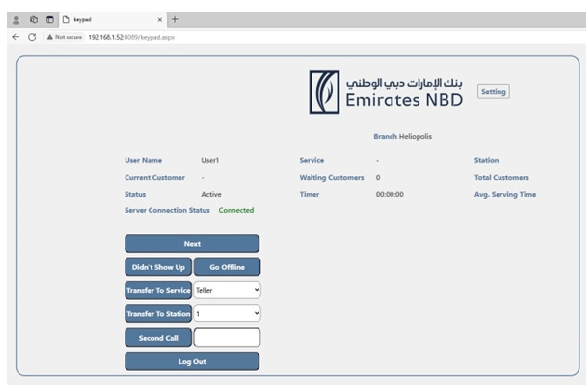
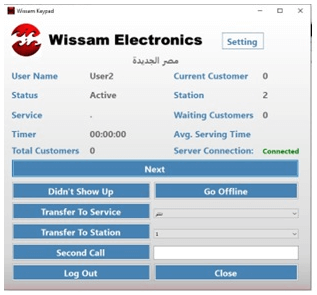
Desktop Virtual Keypad

Web Virtual Keypad

 Giving businesses the freedom to choose the version that best fits their operational requirements and security policies.

Flexible Access Options

  • Users can select between a Desktop Keypad and a browser-based Web Keypad, accommodating diverse operational environments.
  • Secure access is ensured through unique usernames and passwords, protecting system integrity and user data.

Enhanced Security and Personalization

  • The system supports linking each Keypad to a private group by using the organization active directory, enabling integration with the bank’s or organization’s internal login credentials.
  • This ensures accurate identification of employees per branch and allows precise tracking of service performance, helping generate detailed employee reports.

Intuitive Interface and Ease of Use

  • The Keypad is designed with simplicity in mind, allowing employees to:
    • Request a customer.
    • Terminate service.
    • Transfer a customer to another service or window.
    • Recall a customer to continue service.

Real-Time Monitoring and Transparency

  • Staff can view live statistics, including:
    • Total customers present in the branch.
    • Customers assigned to the Keypad Service.
    • Current service time and average service time for the user.
  • The Keypad also shows the connection status to the server, helping quickly identify and respond to technical issues.

Improved Operational Efficiency

  • By giving employees access to essential tools and insights in real time, the Virtual Keypad helps reduce wait times, streamline service delivery, and enhance the overall customer experience.

Hardware Keypad

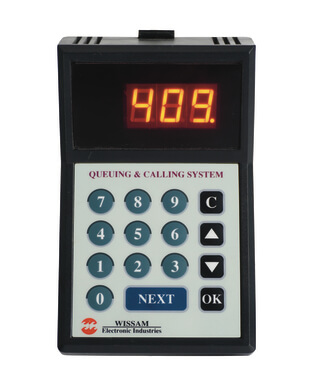
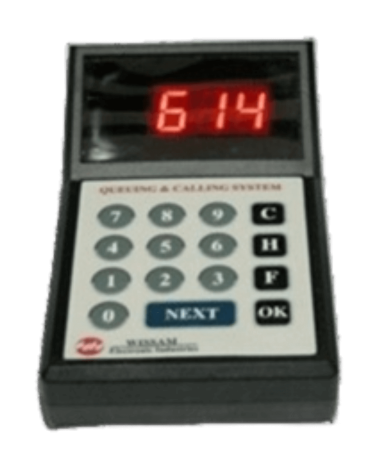
The keypad is an easy to use, menu driven, and plug and play unit placed on the desk of the service staff and used as the employee system tool to call the customer on top of the service queue and some extra functions.

It has a three 7-segment display for the user to view specified system information or to perform any required functionality, it also displays a sequence of messages and shapes “screen saver” which besides being amusing to the user, it also reflects the system status.

The keypad also has a group of reliable membrane keys that allow user navigation through available facilities and functionalities.

Hardware Keypad

Main Keypad facilities and functionalities:

  • The user simply presses the NEXT switch to call the next queue client.
  • The user may type any client no. and press OK for second call, and the system may allow or reject this transaction.
  • Transfer a client to any service or station
  • Two memory banks – each with 100 records length – to store/recall a client no.
  • A two digits comment can be sent to the system to specify current client transaction type.
  • Waiting client(s) existence indicator.
  • Number of waiting queue client’s query.
  • Query for the number of stored clients in M1 and M2.
  • The user may ask for assistance or help.
  • The user may inform the system with a selectable status option.
  • Error messages are displayed to facilitate error diagnose.
  • Programmable unit address.
  • Programmable beep with key press.
  • For easy access, all functions are available with shortcut keys.

Partners of Success

Scroll to Top